PLAN, WRITE, APPROVE AND PUBLISH FOR EVERY CLIENT IN ONE PLACE

One account, one workspace per client. The research, the rules, the approvals and the published record all live where the work happens.

One content lead can run ten client accounts

A content lead who could handle two or three accounts can handle ten. That works because everything Eclipse knows about a client stays in that client’s workspace, so nobody has to go and find it again before the next article can be written. Your team still owns the relationship, the direction, the editorial call and what finally goes out.

1CONTENT LEAD10CLIENT ACCOUNTS
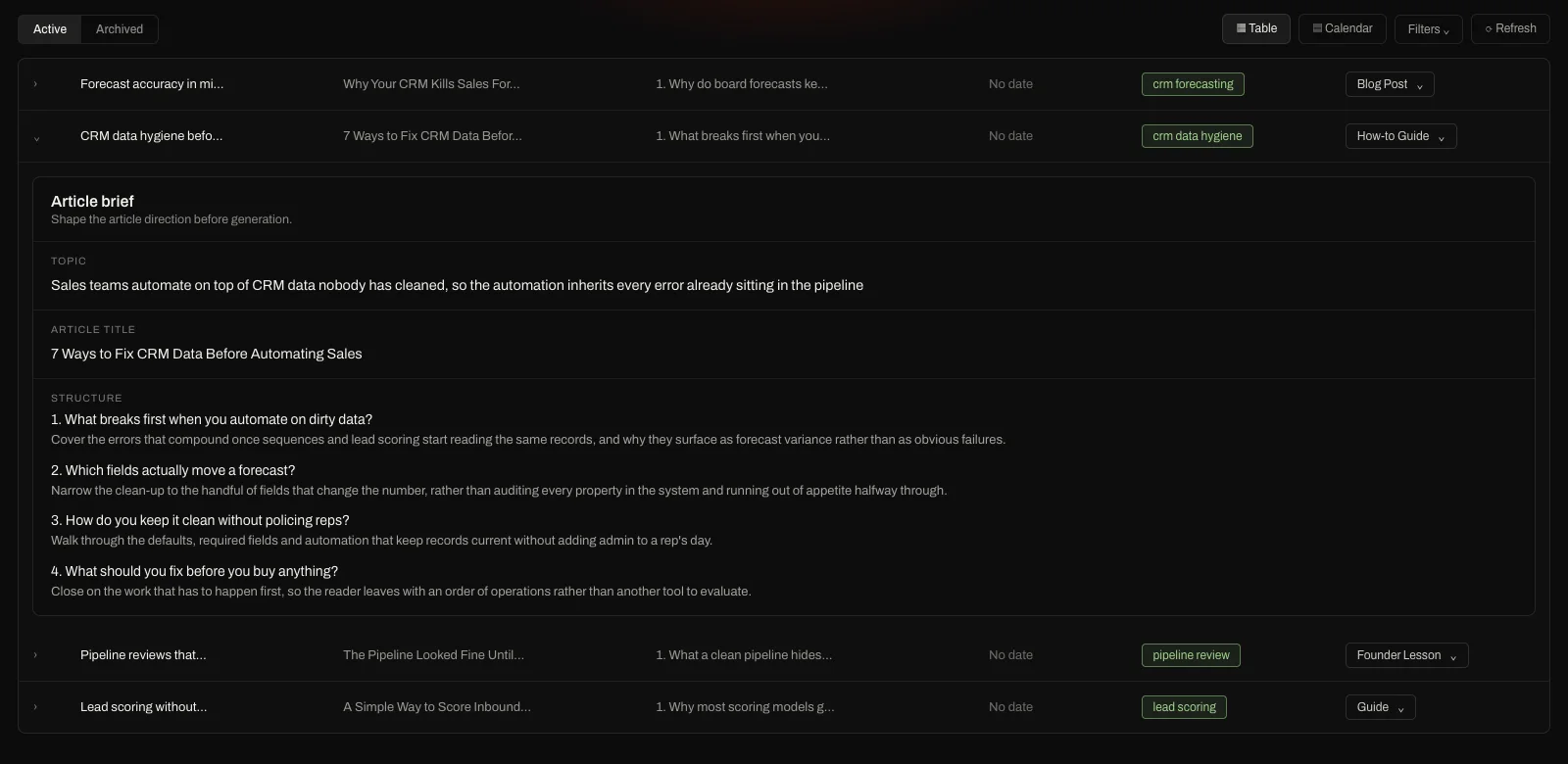
A client content plan in Eclipse with one row expanded to its article brief, showing the topic, article title and a four part structure set before anything is generated

Client strategy stays human

Your team takes the calls, knows what the client is trying to sell this quarter, and decides what belongs in the plan. That does not change.

What changes is the rest of the week, which used to disappear into gathering sources, writing briefs and chasing first drafts.
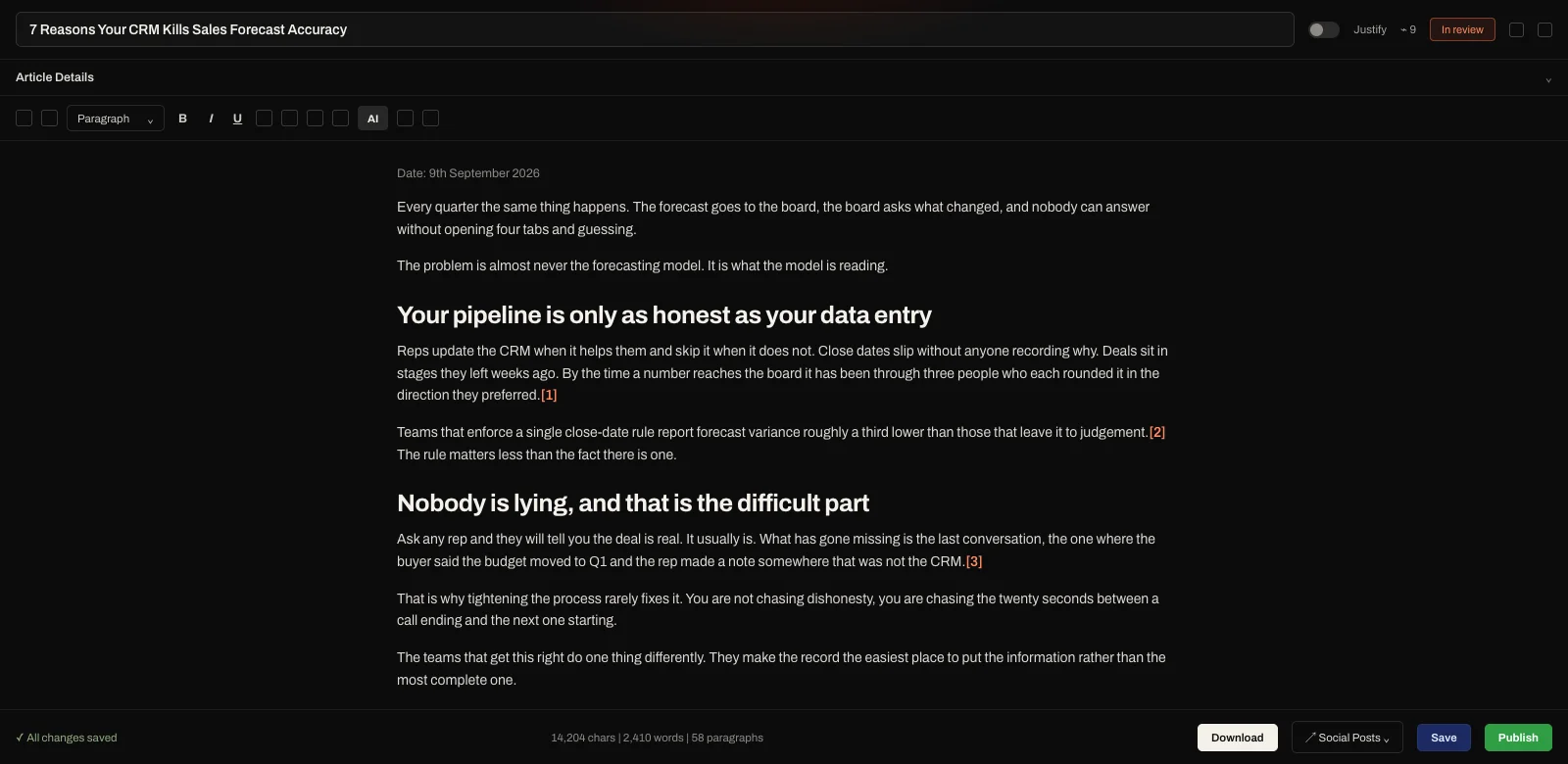
A finished client article open in the Eclipse editor, marked in review, with numbered citations through the body and a footer counting 2,410 words across 58 paragraphs

Review complete articles

Your editor opens a finished, researched article instead of a blank page. They argue with it, sharpen the angle, and add the things only somebody who knows the client would know.

Review is the last thing that happens rather than the first. That is why a lead can carry more accounts without the work getting worse.

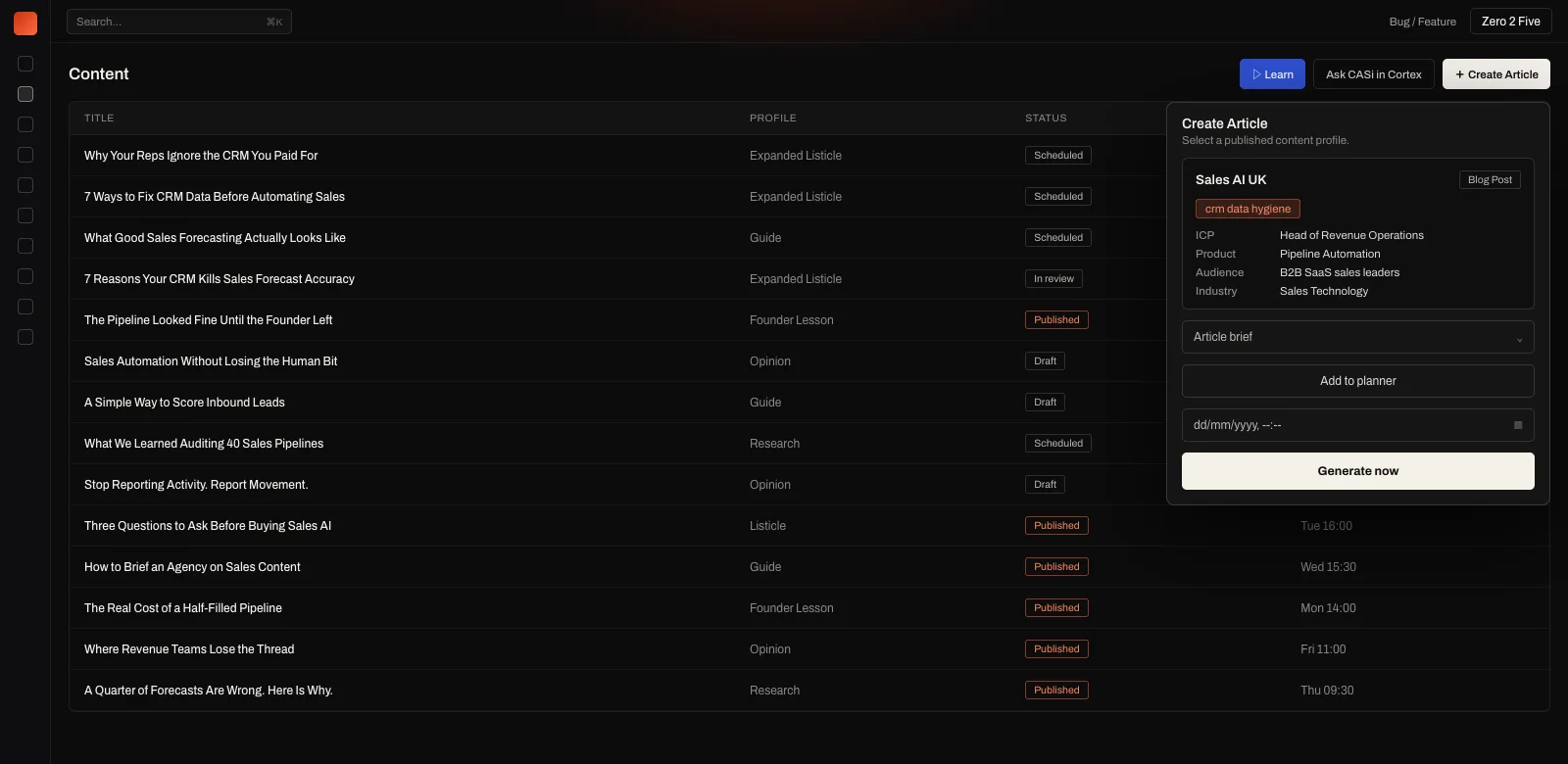
The Eclipse content list with the Create Article panel open, showing a published content profile selected with its keyword, ICP, product, audience and industry already attached, above an Add to planner and Generate now button

Nobody has to prompt it

You are not teaching Eclipse how to write. It knows what a good article looks like and it writes to that standard. You give it the client’s context, the keyword and the content profile, and it goes and does the research.

There is no long back and forth where you keep correcting it. Everything it needs was set up when you added the client.

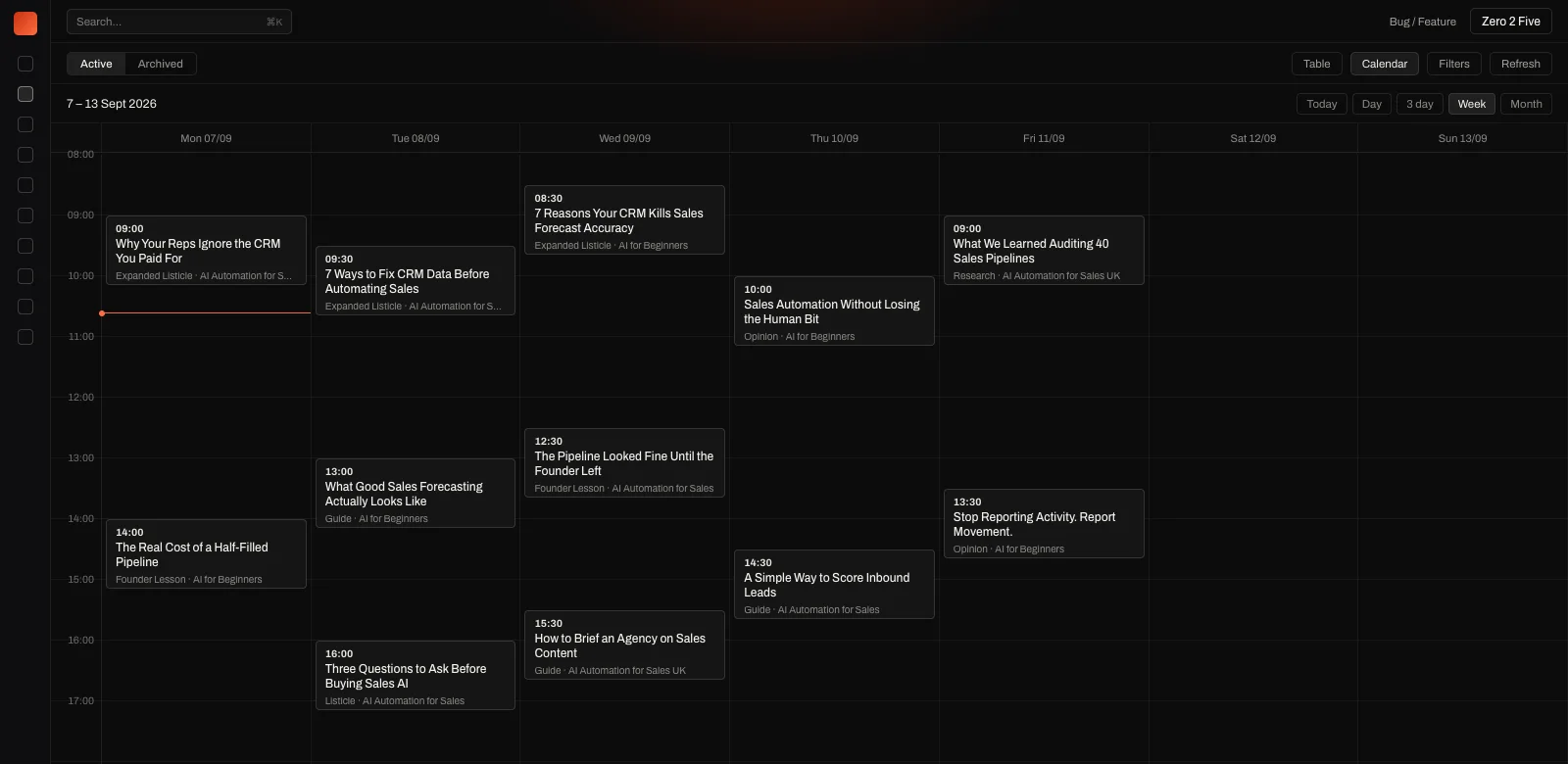
A week in the Eclipse calendar with twelve articles scheduled across Monday to Friday, each showing its publish time, title, article type and content category

Written the day it is due

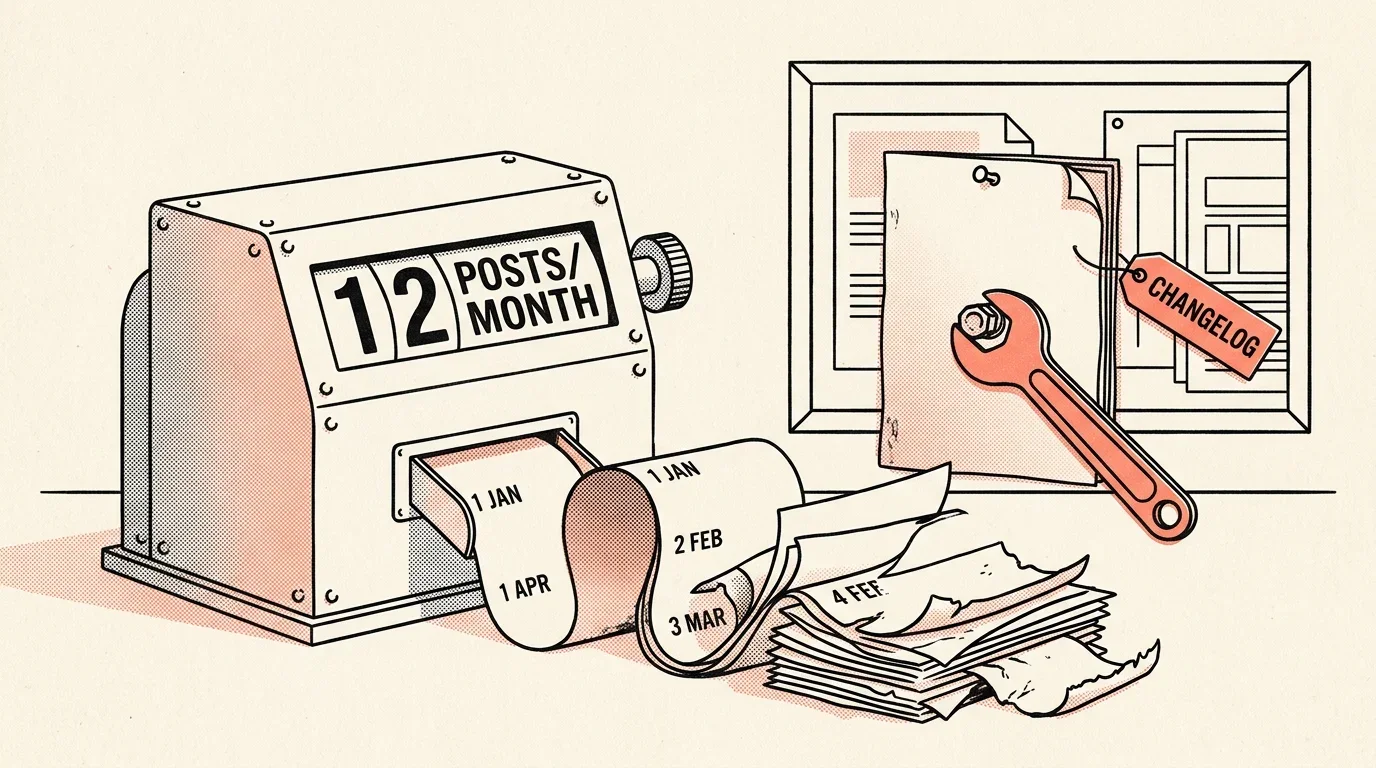
Pick the date you want an article and Eclipse writes it then, using what the market looks like that week rather than whenever the plan was drawn up.

An article planned in January for a March slot gets written in March.

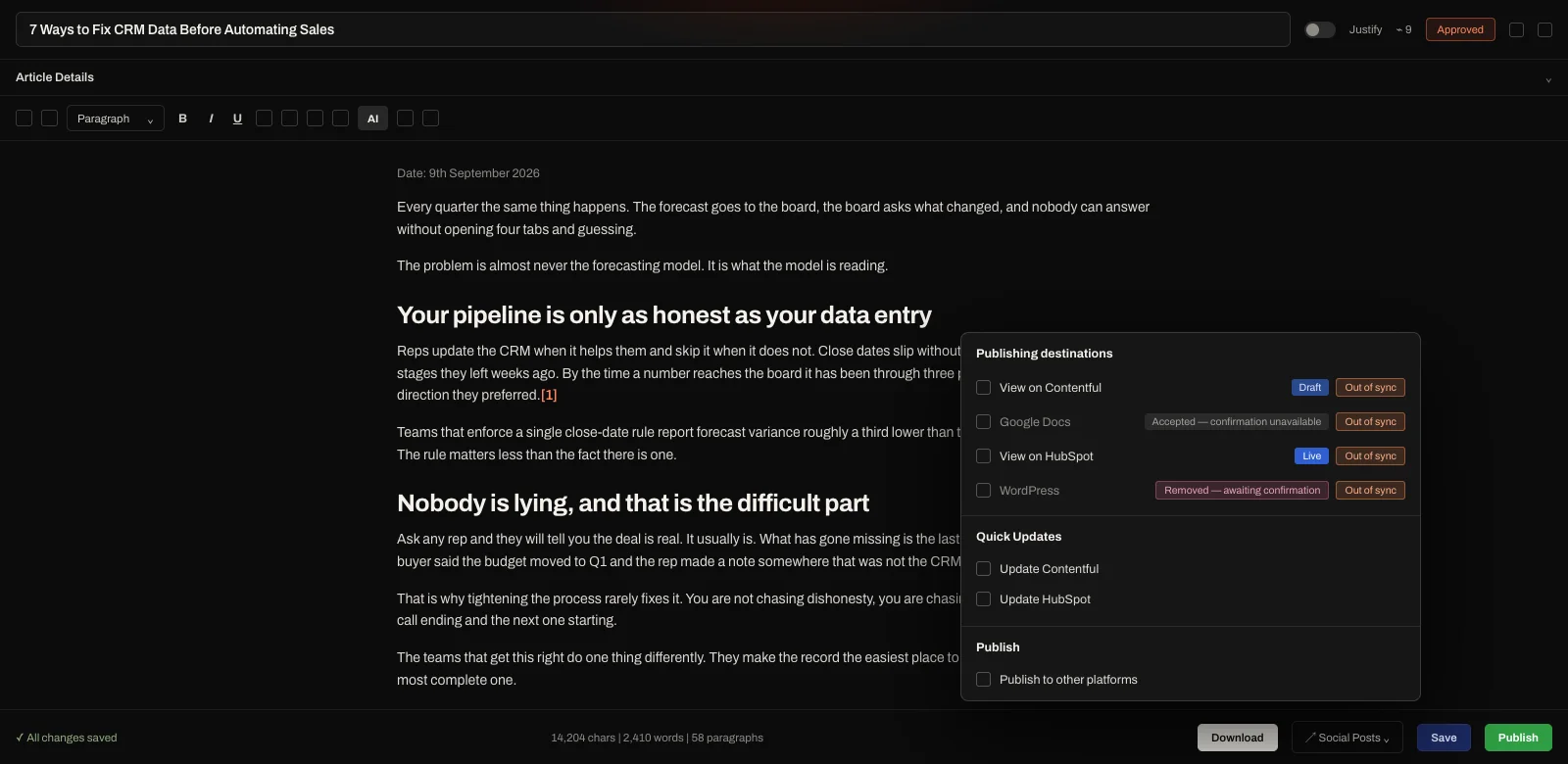
An approved client article in the Eclipse editor with the publishing destinations panel open, listing Contentful, Google Docs, HubSpot and WordPress with their current status against the article

Deliver it however you deliver now

Approved work can go straight into the client’s CMS, into a Google Doc for them to comment on, or through whatever handoff you have with them today.

Whichever route it takes, the approval and the history behind it stay on the account.

You hold the account

Add as many people as you need and assign them to the clients they work on. Several of them can work the same client. Everything they do sits in one subscription that you own, rather than in whatever each of them signed up for.

Your team is on five different AI subscriptions

Ask an agency what it spends on AI and it is rarely one line. Each account manager has picked their own, so there is a Claude seat, a ChatGPT seat, somebody on Perplexity, somebody on Manus, and a few running two.

The agency pays for all of them, and most get used for personal things as well as client work, so one client’s context ends up mixed in with everything else that person has ever asked.

Projects go stale and nobody updates them

A project in ChatGPT or Claude is only as good as the last time somebody topped it up. The client launches something, a competitor moves, the positioning shifts, and the project carries on answering from what it was told months ago.

Nobody has time to keep twenty of those current, so the work quietly gets worse.

An account manager leaves and takes it with them

Everything they worked out about that client is sitting in a subscription you do not control. The positioning, the sources they trusted, the rules, and the reasoning behind every article they published.

In Eclipse it stays in the client’s workspace, so whoever picks the account up starts from there instead of from nothing.

You can see where the money went

You hold one AI balance for the agency and hand it out to your staff. The transaction history shows which client it went on, who spent it, and which model they were talking to.

You can open a canvas and read the work, or join it and steer the account manager while they are still in it.

Your staff keep the AI they prefer

Anthropic, OpenAI, Perplexity, Google, DeepSeek and Grok are all in Eclipse. Your team uses whichever one they like, and they can switch model part way through a conversation and carry on where they left off.

Nobody needs a separate account for it, and you are not paying for one.

You can take everything out in one click

Every chat, every canvas and all the research exports whenever you want it. It is your data and we do nothing else with it.

Client material sits in one account you control, behind enterprise grade security, rather than spread across half a dozen consumer subscriptions.

Stop rebuilding the client brief at every handoff

Everything you know about a client and everything the research turns up stay in the same place, from the first conversation through to the version the client signs off.

Connect their systems and your own

Your client has probably given you access to their Notion, their Google Drive and their CMS, and you can connect any of those. You can also connect your own systems, because a lot of what you know about a client is in your account notes and call write-ups rather than in anything they handed over.

All of it lands on the same canvas as the competitor pages, Reddit threads and research Eclipse brings in, and your team picks what should shape the article.

NOTIONCONFLUENCEGOOGLE DRIVEMONDAY

Your client never sees Eclipse

Send the article to Google Docs for them to comment on, or push it straight into their CMS. They review it where they normally review things.

They have no login for Eclipse and no reason to know it exists unless you decide to tell them.

CONTENTFULHUBSPOTWORDPRESSGHOST

Have a chat with Jen and see the platform

She will open the screens she is talking about, and you can cut in whenever you like. Type your questions instead if you would rather.

Know what every client should publish next

Between one review and the next, Eclipse watches what moves in each client’s market and works out what is worth writing about. You walk into the meeting with the reason attached, rather than a list of topics somebody thought of on the way in.

See what changed since the last review

Rankings shift, competitors publish, people ask new things on Reddit, and the AI answers change their minds. All of it happens in the four weeks nobody was looking.

Eclipse tracks it per client, so you can see what actually moved without spending a morning working it out.

Recommend the right response

Sometimes the answer is a comparison page. Sometimes it is fixing a page you already have. Sometimes it is doing nothing at all.

You recommend what the account needs rather than topping the plan up to hit a number.

Let the result shape the next plan

Every article stays tied to the reason it was written, so you can see later whether that reason held up. Rankings, the queries people actually used, AI citations and traffic all come back to it.

By the next review you know whether to push further, fix the page, or leave it and go after something else.

Make the case before asking for approval

Each recommendation carries the thing that prompted it, whether that is a question buyers keep asking, a gap a competitor has left, or a page that has started slipping.

The client can see why it matters now, and your team has already written down who it is for and what it has to prove.

Turn each client’s market evidence into GTM assets

What gets published feeds back into the next plan.

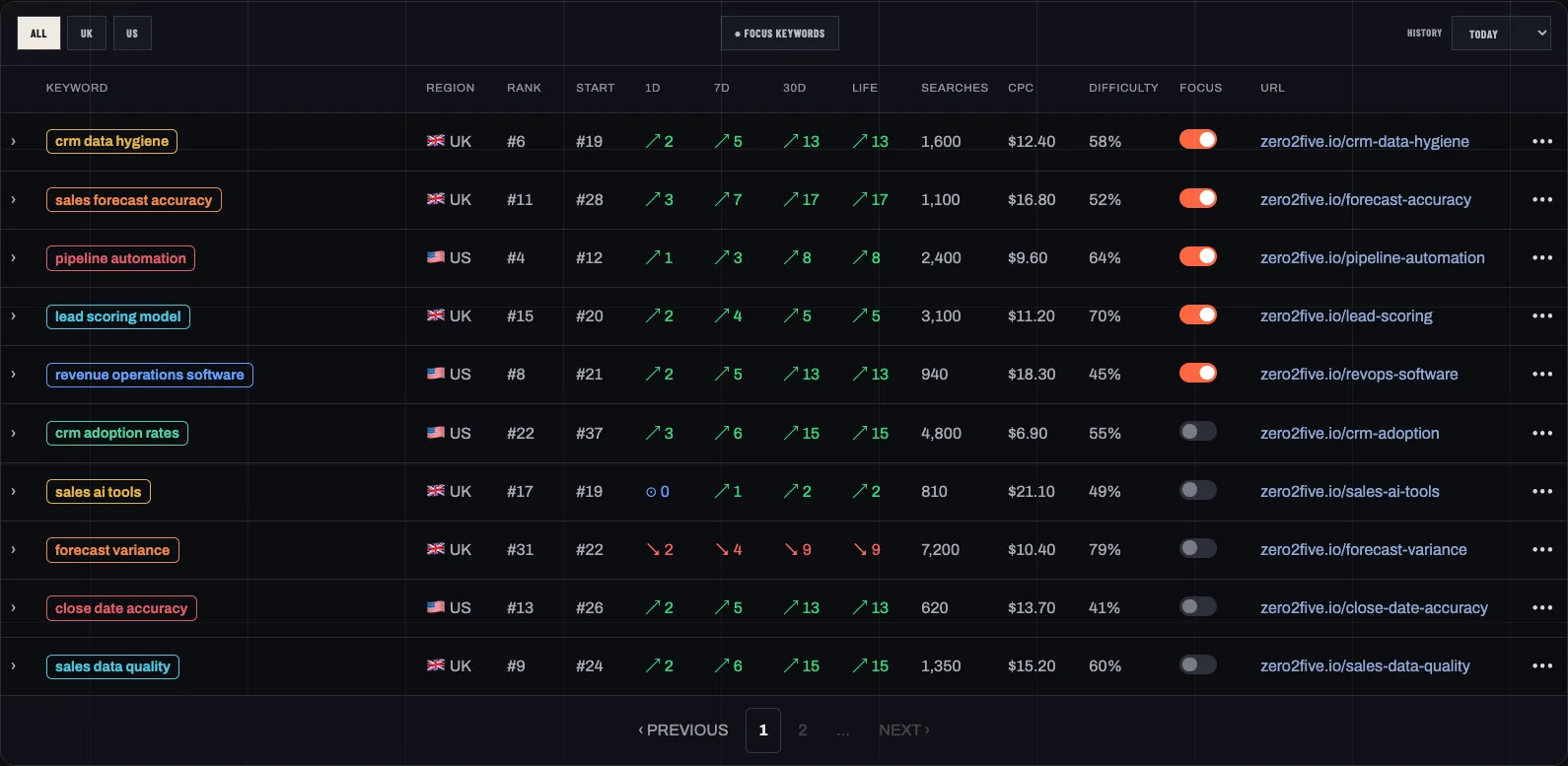
Keyword tracking for one client account in Eclipse, listing ten tracked terms with their current rank, the rank they started at, movement over one day, seven days, thirty days and lifetime, monthly searches, cost per click, difficulty and the page each one points at

Evidence becomes assets

Buyer questions, search demand, competitor moves and what you know about the client all get filed against the right product, audience and market. Once the client approves something, it goes through planning, production and publishing without anyone rekeying it.

Results shape the plan

Rankings, AI citations and page performance come back into the client’s workspace, so the next brief is written against what actually happened rather than what you hoped would.

Keep every account on brief

You set up a client’s products, buyers, markets, positioning, proof and editorial standards once. Everything the team plans or writes for that client is built on it.

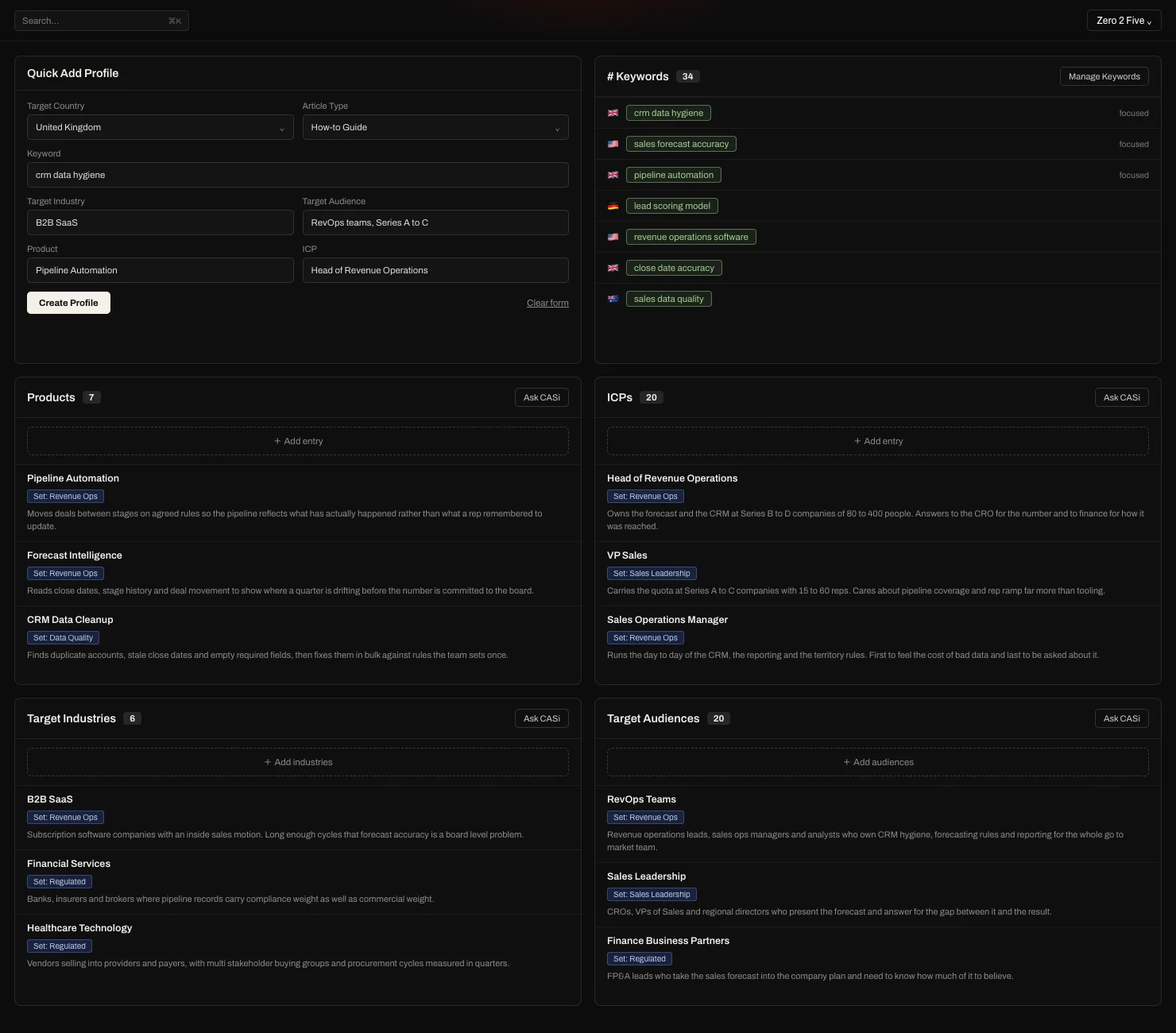
Account setup for one client in Eclipse, showing 34 tracked keywords across four countries alongside seven products, twenty ICPs, six target industries and twenty target audiences, each written out and grouped into sets

Set up who your client actually sells to

Take a healthcare client with seven products selling to twenty different buyers across four territories. You can map all of that, then run an article for one product, aimed at one of those buyers, in one territory, on one keyword.

What comes back is written for that combination rather than for the client in general.

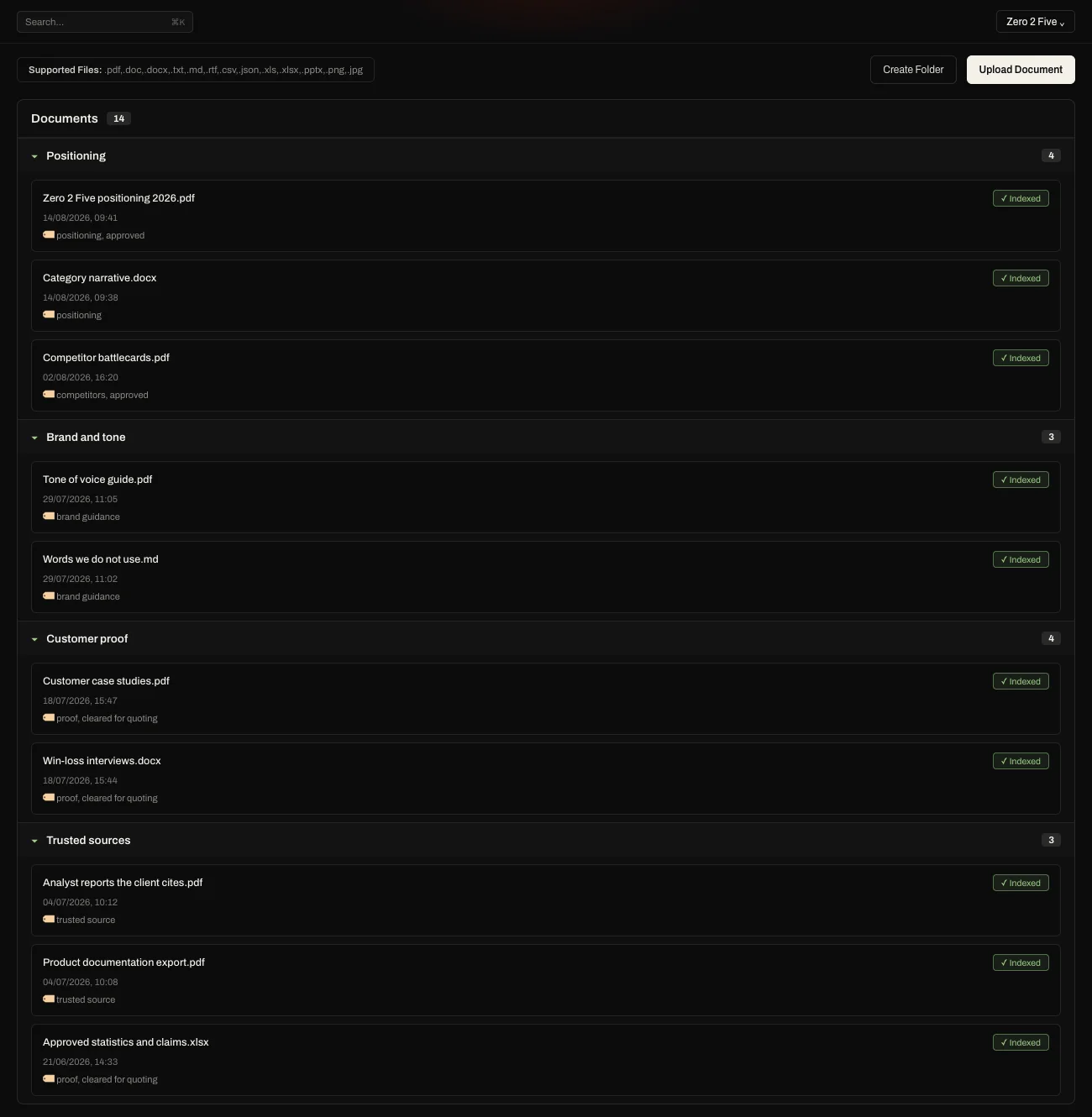
The document library Eclipse trains on for one client, with folders for positioning, brand and tone, customer proof and trusted sources, every file marked indexed and tagged with whether it is approved or cleared for quoting

Use approved client knowledge

Positioning, brand guidance, sources the client trusts and proof you are allowed to quote all live in the workspace, so the writing only ever draws on material the client has signed off.

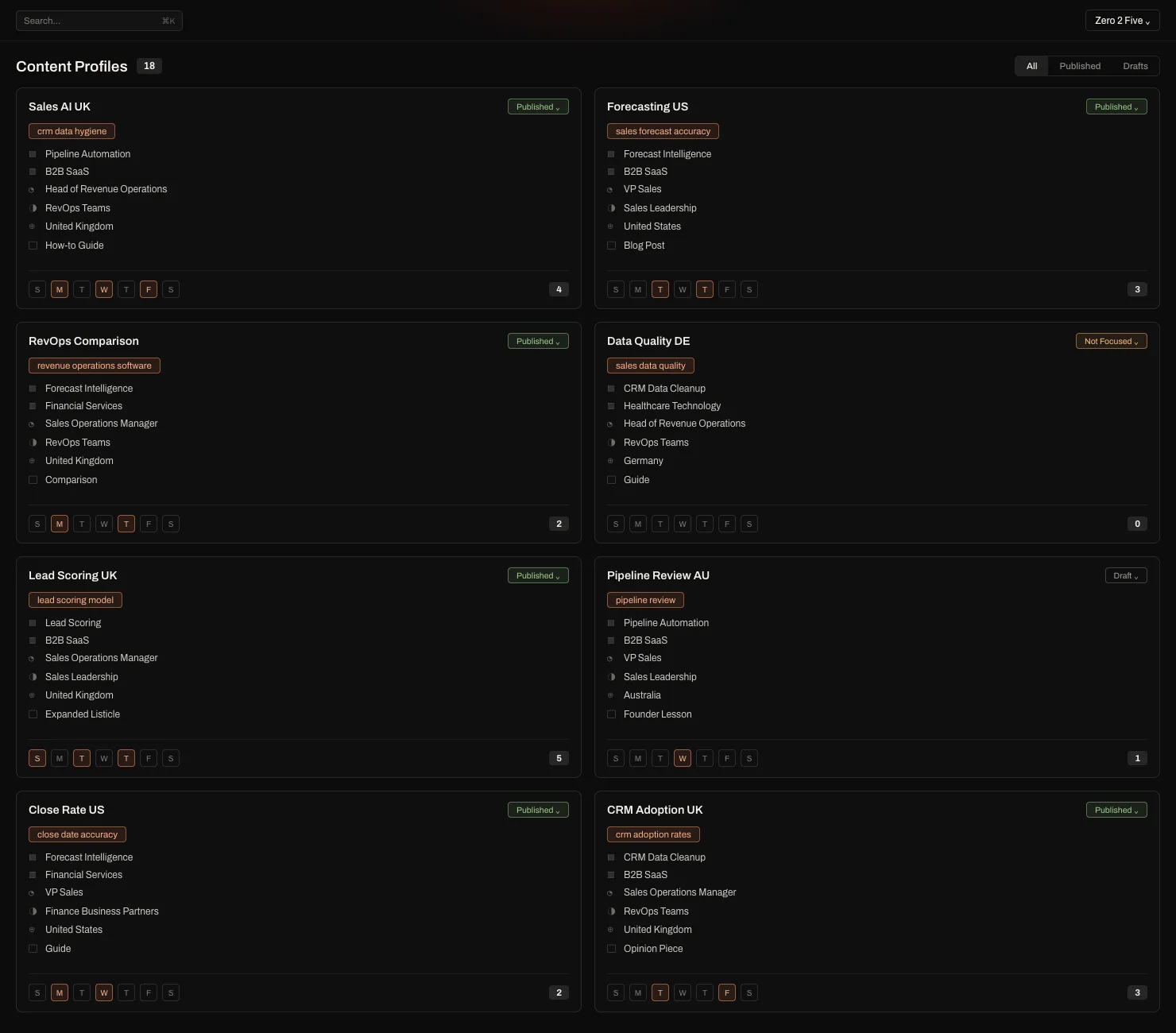
Content profiles for one client in Eclipse, each holding a primary keyword, product, industry, ICP, audience, country and article type, with a published, draft or not focused state and the days of the week it runs on

Set the content rules

Content Profiles hold the article type, the primary keyword and whatever else that client insists on. Review controls stop anything leaving until it meets the standard you agreed with them.

Take a real client article through the full workflow

Pick a client who has work in the plan anyway. We set the workspace up with your team, run the first article all the way through, and leave whatever review process you have with that client exactly as it is.

Use a real brief

Bring a topic that is already on the plan, along with the notes and sources you have for it. Your team learns Eclipse by finishing work they owed the client anyway.

Configure the account

We set up the client’s products, buyers, competitors and content rules with you, decide who on your team gets access, and connect wherever the article is going to be published.

Add the next client

Once that article is written, reviewed and delivered, you do the same for the next client. Nothing from the first one carries over.

One plan, unlimited clients

You run the content, analytics, AI visibility and SEO work for every client from one agency account. Each client’s work is kept in a separate workspace, and nothing moves between them.

Your clients never see Eclipse. Approved work goes to their CMS, a shared doc, or wherever you hand off now.

Start with one client for a month before you commit.

The full GTM content system

£795PER MONTH

Everything in Eclipse, in every client workspace you run. Research the market, create cited articles, prepare social drafts, track visibility, and publish to the client’s CMS once approved.

  • Isolated client workspaces
  • Cited articles from real research
  • Refresh for published articles
  • Cortex research canvas
  • Competitor intelligence
  • Monitors for web, news and media
  • Social drafts and scheduling
  • Reddit monitoring and responses
  • AI visibility reports
  • Full keyword analytics and tracking
  • CMS and Google Docs publishing
  • Staff access and AI balance you control
  • Guided onboarding and support

97% publish without a rewrite. Nothing goes live without your approval.

We use Eclipse to grow Eclipse

Every article on our blog was made in Eclipse, from the research through to publishing it and measuring what it did. It is the same system you would be buying.

See one client go from brief to delivery

Bring a brief you are working on now. We will run it through, and you can see how one client’s work stays separate from the rest while the research, writing, review and publishing all stay joined up.