Declared interest before you start: I build Eclipse, a content operating system for agencies, so weigh the argument below accordingly. Eclipse also ships a named AI Visibility component alongside its research canvas, editor and publishing pieces, which puts me inside the category this article is about. I come back to what that does and does not change near the end.
A client emails on a Tuesday. A competitor keeps turning up in ChatGPT answers about their category, and they do not. You already have the data. It sits in the research doc, the approval thread, the CMS, a chat session somebody closed without saving, and an AI visibility platform one of your strategists bought at the end of last year. Finding the answer takes forty minutes. The answer is one sentence long.
Assume the shape I know best for the rest of this: nine people, eleven B2B accounts, three regular freelancers. Every example below holds to that.
You reply, and the account lead asks where the number came from. Nobody can say. Your agency does not lack signal. It lacks a place where signal becomes a decision, and where the decision survives the person who made it.
Why another AI visibility platform does not add capacity
An AI visibility platform tracks where a brand gets mentioned or cited inside AI-generated answers, across engines like ChatGPT, Perplexity, Gemini, Claude and Google AI Overviews, against named competitors, over time. Underneath that headline the category is fairly uniform. You get prompt-level reporting, so you can see which buyer question produced which answer and which URLs got cited in it. You get trend lines on mentions, citations and rank, so this month reads against last. Most also score sentiment, compare you with named competitors on a defined prompt set, and audit whether your client's pages are readable by the crawlers feeding those answers. Where the tools actually differ is narrower, and worth asking about directly: how often each engine is sampled, whether you can see the cited source URLs behind a score or only the score itself, and whether anything exports into the place where the next article gets planned. The question to hold against all of it, and I come back to it at the end, is which decision the tool improves, who makes that decision, and where the resulting choice gets recorded. Useful. Buying one also adds a surface you have to govern, with its own copy of the client context and an export where you wanted a decision.
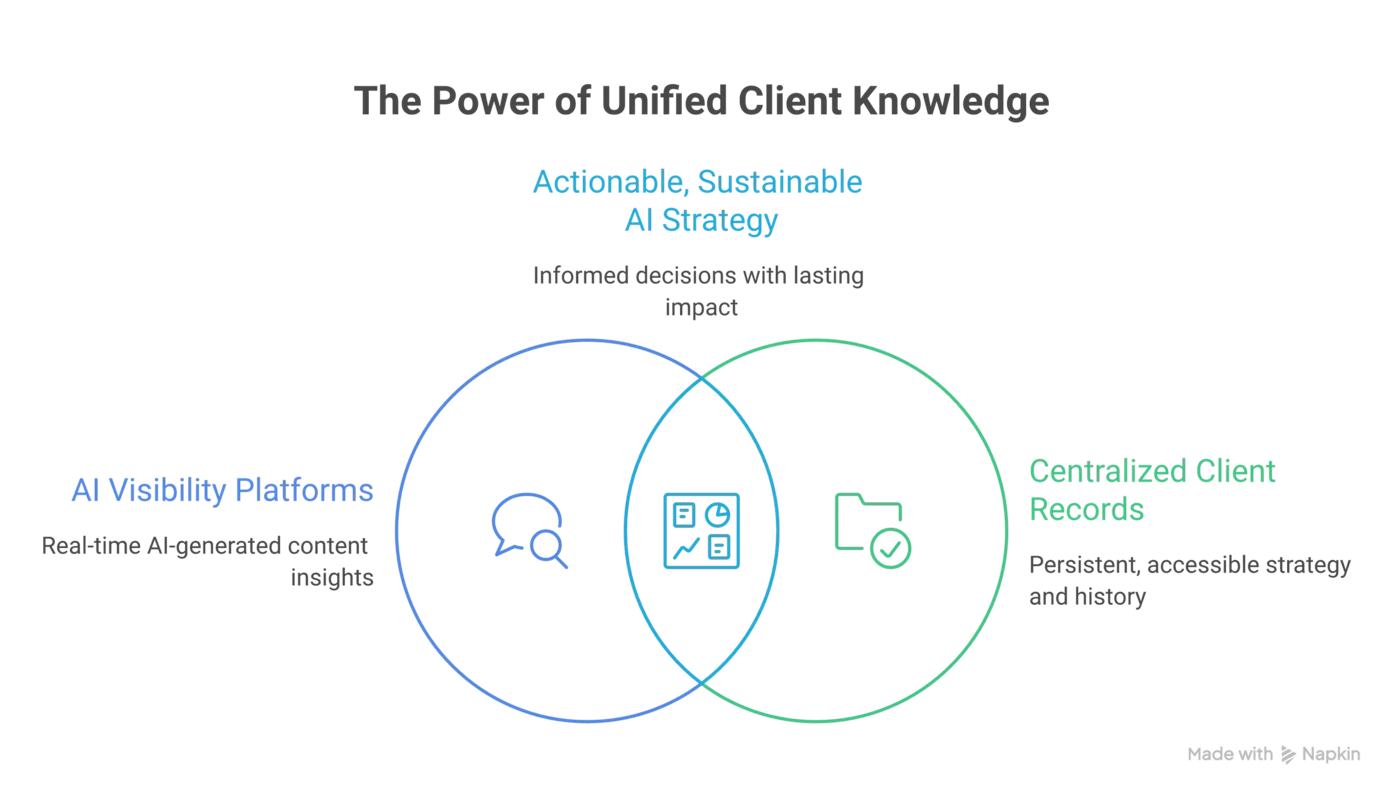
What you need is one persistent record per client, holding strategy, prompt set, competitors, evidence, decisions and approval history. That record is the reusable asset. Everything else in this article is about protecting it.
Think about what happens when a new tool lands. Someone configures it for all eleven accounts. Someone re-enters brand names, competitors, target questions. Someone builds a reporting view. Then a different person, three months later, has to work out which of the four places holds the current version of the truth.
Paid media at least counts the setup cost out loud. Fluency's 2026 benchmark study of more than 170 advertising organisations puts routine AdOps execution somewhere between roughly 40 and 46 hours per strategist per month, depending on which tasks get counted: PPC Land, reporting the same study, gives 39.75 hours for campaign optimisations and budget pacing, while MarTech Cube reports around 46 hours once account launches are included [1]. Take the top of that range and check the arithmetic yourself. Forty-six hours a month is about 550 hours a year, which against a 2,080-hour working year is roughly a quarter of it, or about three months per strategist. That is paid media operations, and it proves nothing about how long your editors spend arguing with a draft. The same disease shows up in a different department: configuration and re-entry eat the capacity you thought you were buying.
AI-assisted production makes this worse in one specific way. It raises the volume of material needing review faster than your review process changes. Your editors and account leads did not double. Neither did the client's sign-off window.
Governance is what protects capacity
Governance keeps five things visible at once: the purpose of the article, the sources behind each claim, who decides, what state the approval is in, and which version is current. When those slip, you pay in rework, in feedback that contradicts last week's feedback, and in claims nobody can stand behind when a client's reviewer asks where a number came from.
Most agencies find this out through the symptoms. An account lead approves a change on a call, nobody records it, and the same point gets relitigated at the next review. AI did not invent that failure. It runs more material through the same unchanged process.
The evidence register, for clients whose legal team signs off
If you run a regulated account, the artefact legal signs is a claim-by-claim evidence register plus a dated snapshot of the exact text approved. Build that register once per client and the sign-off stops being an interrogation.
Here is the low-process version I would run. Each factual claim in a draft gets a short ID, C1, C2, C3, in sequence. The register is one table in the client's workspace with six columns: claim ID, the claim as written, source type, the source reference, the date it was captured, and the person who captured it. The draft carries only the ID next to the sentence. The reference lives in the register, once, so an editor rewording a sentence does not have to touch the source, and a reviewer reading a PDF export can still find C7 without hunting through comment threads.
Source type does the heavy lifting on B2B accounts, where half your numbers are the client's own and have no public URL. Three values are enough.
- Public. A page, report or filing anyone can open. The reference is the URL plus a saved copy.
- Client-supplied. A figure from their dashboard, deck or finance team. The reference is the file they sent, the named person who sent it, and the date.
- Internal analysis. Your own calculation. The reference is the working, and the row names who did the maths.
Roles follow the type. The writer creates the claim ID and the row at the moment of writing. The editor checks that every ID resolves to something a reader could open and that the wording has not drifted past what the source says. The account lead confirms the type, because legal treats a client's own assertion very differently from third-party evidence. Legal signs two things: the register and the text snapshot.
What makes this survive Google Docs is the one-way rule. Edits happen in the draft, sources only ever change in the register, and a comment that questions a claim quotes the ID rather than the sentence. Cut a claim at 4pm and the row stays, marked cut with the date, because an orphaned row costs nothing and a deleted one destroys the sequence.
Capture, link, freeze, sign off
Here is the same register running through a real tool boundary, because your drafting still happens in a doc and your client still approves over email. Take one claim on a payments client. The writer finds a regulator page, captures it, and the register row reads: C4, the claim wording, public, the source URL, 12 March, her initials. In the doc, the sentence ends with the bare token C4, with no hyperlink or footnote.
Capture means the source is saved, not just linked. A URL rots. Take a dated PDF print of the page into the client folder, name it with the claim ID and the capture date, and put that filename in the register beside the URL.
Now count the cost before you impose it, using my own numbers rather than anything measured across the industry. A 2,000-word B2B article on my accounts carries perhaps eight to twelve claims worth capturing. At two minutes each, that is sixteen to twenty-four minutes an article. Run four articles a month on an account and you have added between one hour and an hour and a half. Across eleven accounts, split between writers, nobody loses a day. The arithmetic only breaks if you capture everything, so do not. Skip capture for anything the reader can verify by looking at the client's own live site, anything the client has already published, and any claim the editor would accept without a number in it. Numbers, comparisons, regulatory statements and competitor assertions get captured. Adjectives do not.
A client-supplied figure runs the same path with one extra step. The writer asks for the source of the number, gets a dashboard export or a line in an email, saves that file into the folder, and names the person who vouched for it in the register. Sales operations says the churn figure is 4.1%, and the row says so, with their name and the date they said it. At freeze, that row goes to the account lead, who confirms with the client contact that the vouching still stands. Legal is then reviewing a named person's assertion rather than an anonymous number, which is the difference between a question and a delay.
Freeze means the moment before the client sees it. Export the draft as a PDF, name it with the article slug and the date, and record that filename at the top of the register. The register is now pinned to one specific text. The email to the client carries three things: that PDF, a link to the register, and the question you need answered.
Sign off means the approval email is evidence, and you treat it that way. The account lead copies the approval reply into the register footer with the sender, the date and the exact snapshot filename it refers to. Formaloo's guidance on approval audit trails makes the point plainly: recording only the final status leaves gaps, because the word approved does not show whether the approver had authority, whether the evidence changed underneath them, whether a required review got skipped, or whether anyone can retrieve the record two years later [2]. Scrut's guide to audit documentation names four things auditors test: completeness, timestamps, reviewer identity, and traceability from each record back to the thing it is supposed to prove [3]. Your six columns plus a superseded row plus a pasted approval carry all four.
Where the register and the draft physically meet
The register holds only if it points at one exact artefact and that artefact points back. You can build this in Drive and a spreadsheet this week, with no new software and no change to how your client reviews.
One folder per client, one subfolder per article, named with the client code and the article slug. Inside it, three things: the working doc, the captures, and the register. The register is a single sheet in that subfolder, never a tab in a shared master, because a shared master is how one client's evidence ends up beside another's.
The join is two-directional and takes one line each way. At the top of the register, a cell holds the snapshot filename and the doc revision it came from. At the top of the draft, one line reads: register, this file; current snapshot, that file. Google Docs already stamps a named version when you use version history, so name the version with the same date string as your snapshot PDF and the two line up without anybody copying a long link.
Now the honest part. That join is a human typing a filename into two places, which is exactly the kind of discipline I am about to tell you collapses the moment nobody is watching. It will break. Somebody will re-export the PDF after a late edit and leave the old filename in the register, or rename the doc and not the sheet. You cannot prevent it, so catch it.
The catch is a ten-minute weekly pass, one person per account, usually the account lead. A broken pointer has a specific look: the snapshot filename in the register names a date, and the doc's version history has a later named version with no matching export. That mismatch takes five seconds to spot once you know what you are looking at, and the fix is re-exporting and re-recording. Found on a Monday, it costs nothing. Found when a client asks which version their legal team approved, it costs the account's confidence in you.
If your team drafts in a project tool instead, the fallback is the same shape with a different container. The article's task carries a field for the register URL and a field for the current snapshot filename. Nobody has to remember which is live, because the task shows both.
What a reviewer checks
Give your editor this and reviews stay fast. Every row needs one field the six obvious ones do not cover: a line of interpretation, written where the source says something narrower than the claim. That is the field most teams skip and the one legal asks about.
Then four checks, a minute a claim:
- Every ID in the draft has a row.
- Every row has a capture file that opens.
- The claim as written stays inside what the capture says.
- The interpretation note flags anything the source does not cover.
Those last two are what stop a claim drifting past its source, which is the failure a reviewer actually finds.
Drift is the case nobody plans for. Your editor sharpens a sentence, and the sharper version now says slightly more than the capture supports. Do not send it back to the writer. The editor has two moves, both faster than a handover: soften the wording until it sits inside the source again, or leave the wording and write one line in the interpretation field naming the gap. Anything the editor cannot resolve in a minute gets the claim cut and the row marked cut, because a claim worth an extra day of research is a claim worth planning properly next month.
When a source changes after you captured it
Four things trigger a re-capture. The URL breaks. The page carries a later revision date than your capture. A client reviewer disputes what the source says. Or the claim is older than twelve months and about to appear in something new.
Re-capture does not rewrite the row. Capture the current page, open the next letter in the sequence, C4b, and mark C4a superseded with the date and the reason. The old capture file stays where it is. Your client's compliance reviewer eventually asks the question only history answers: was that figure correct when we signed it, or did we approve something already out of date? A mutable status field cannot answer that, because the chronological record has to preserve the prior value, the new value, the actor, the time and the reason, and overwriting the row erases exactly that [2].
Already-published articles get grandfathered. The frozen pair, snapshot plus register, proves the claim was current on the day the client approved it, which is the only thing anyone asks about a published article. Re-approval is needed in two cases. The source now contradicts the claim, in which case you correct the live article and log the correction. Or the article is going out again as a refresh, in which case the new snapshot goes back through the client stage with the changed rows flagged. Everything else stays as it was, and you have not invented a rolling re-approval workload nobody has capacity for.
What the three handoffs demand
Capacity leaks at three points: writer to editor, editor to account lead, account lead to client. Each handover either carries the record forward or forces the next person to rebuild it.
Writer to editor. The draft arrives with the buyer question it targets, the competitor answers it has to beat, and a claim ID on every number. Block the handover when a claim has no source attached. An editor who has to ask where a figure came from has just become a researcher, and you are paying senior rates for that.
Editor to account lead. What gets decided here is the editorial call, and it is the thing most likely to vanish. Record it while the conversation is still live, with the name of whoever made it and the reason, so the next reviewer inherits an argument rather than a preference.
Account lead to client. This is where the calendar dies. One approval-tool vendor's own measurement of social approval cycles, published on the ZoomSphere blog rather than in independent research, puts the chase at 35 to 45 minutes per post, spent composing the handoff, following up and finding the reply in the wrong thread [4]. That figure covers short social posts, not articles, so treat my extension of it as an assumption rather than a measured result: articles carry more claims and more reviewers, so the chase is unlikely to be cheaper. Two things fix much of it, and neither needs new software. One named approver on the client side, and an agreed response window before content starts moving.
When the client will not name one approver
Some clients cannot give you a single name. Regulated ones often cannot, because sign-off genuinely sits in a queue their marketing contact does not control. Stop negotiating for a name and negotiate for a route instead. Ask for a named router rather than a named approver. Their job is to hold the article and tell you who has it and when it went in. That person is usually the marketing manager you already talk to, and they will accept a routing role after refusing an approval one.
Then split the sign-off in two: brand and factual review on your side, regulatory review on theirs. Only claims with a regulatory implication go to the lawyers. Most articles have three claims a lawyer needs to see, not thirty, and the queue moves accordingly.
The clock lives wherever your delivery plan already lives. If that is a project tool, it is a date field named client review due and a saved view called stalled. If it is a spreadsheet, it is a column with a date and conditional formatting that turns red. Neither needs a purchase. What it needs is one person who opens that view every morning, and the account lead is the only sensible candidate.
The escalation play, written before you need it
Clocks only work if something happens when they expire. Decide now what that something is, because in the moment you will just send another polite chase. These intervals come from my own delivery, so tune them to the account.
Give the client stage 48 hours. At 24, a reminder goes to the router with the evidence packet attached. At 48, the article shows as stalled in the plan and the account lead, not the writer, owns the next move. At 72, one of two things must be written down: greenlight, or a formal deferral with a new date and a named reason. No third option. A stalled article with no decision and no deferral is an agency problem disguised as a client problem.
The packet is the point. It is assembled once, at freeze, and reused at every escalation rather than rebuilt: the same snapshot and register pair described above, with the blocking claim IDs named. The account lead forwards it again with one new line at the top saying where the clock now stands.
At 48 hours the account lead does three things before picking up the phone. Confirms the draft has not moved since the snapshot, which takes one glance at the doc revision named in the register. Names the specific claims blocking, by ID, so the router can ask a lawyer about C4 and C9 rather than about an article. Then calls the router with one question: who has it, and what date can they commit to. That call is the least comfortable ninety seconds in the week, and it is cheaper than the fourth silent day. Come back with a name and a date, or come back with a deferral. Either answer unblocks you. Silence does not.
Whatever comes back goes into the register footer the same way an approval does, with sender, date and the snapshot it refers to. A deferral logged five times becomes your renewal argument for a standing slot in their review calendar.
Count the cost of that mechanism honestly. A stalled flag in front of the whole team embarrasses people, and now and then you will publish something a client's specialist would have sharpened. Choose which cost you prefer, since the alternative you have today is a launch date held hostage by a four-day silence.
Why records decay, and what makes one hold
The register only holds if opening it is faster than guessing. Two failure modes account for most of the decay.
The first is the mandatory field that holds only while one senior editor polices it. I have watched exactly that. We had a sources column in the tracker, filled in on every article for about five months, because our senior editor refused drafts without it. She took two weeks off in August. Three articles went out in that fortnight with the column blank. Two were fine. The third carried a market-size figure a writer had picked up from a competitor's blog, and the client's product marketer asked for the original report. There was no original report. We retracted the sentence and reissued the article. Nobody had been careless. The field had never belonged to the process, only to her.
The second is the checklist that adds a day to a three-day turnaround, so people complete it after publication from memory, which is worse than having nothing, because now the record lies. Test any process against the two people least able to give it attention, the freelancer on two accounts and the account lead with three client calls stacked before lunch. If it needs enthusiasm, it will not survive August.
So the weekly pass is the floor, not an extra. Ten minutes, eleven accounts, split across two people. When the senior editor is away, that check is the only thing still running, and it catches the blank column in days rather than after a client asks.
Delete any field nobody reads in a review. Keep the ones that block a handover, because those are the only ones with teeth.
Where context leaks, and the gate that stops it
Context that leaks between accounts creates commercial risk. It rarely happens dramatically. A planning template built for client A carries A's positioning language into B's article. A shared research folder outlives the engagement that created it. A freelancer on two competing accounts remembers a roadmap detail they should not.
Behavioural advice will not hold this. Asking a writer not to open account B in the same session fails the same way the sources column failed, the moment the person enforcing it is busy. So put the gate at writer to editor, beside the claim ID check, and give it three tests the editor can run in under a minute.
- Template provenance. The draft names the client folder it came from. A template pulled from another account's folder gets rebuilt from the client's own outline before it moves. One line at the top of the draft, ten seconds to read.
- Register scope. Every claim ID resolves to a row in this client's register, never to a topic register shared across accounts. When two clients share a competitor, each register holds its own dated capture of that competitor's page.
- Named positioning. Any positioning or proof language in the draft traces to this client's approved knowledge. Unattributed positioning counts as a claim with no source.
Freelancers get a tighter version. Give a freelancer on two competing accounts access to one client's register and folder at a time, revoked at the end of the engagement rather than whenever someone remembers. No shared research drive, no cross-account template library, no second client's prompt set in view.
When it happens anyway
It will happen. Someone drafts in the wrong client's folder, or pastes A's positioning into B. Work the correction in five steps, in this order.
- Find the scope. List every artefact that touched the wrong workspace: the draft, the register rows created there, any capture files, and anything already sent outward. Check sent items, not just the folder.
- Freeze what has gone out. If a snapshot already reached a client, stop the clock on it and tell the account lead before you tidy anything. A quiet fix that the client later discovers costs far more than an early call.
- Move the record, do not copy it. Relocate the register rows and captures into the correct client's subfolder, then delete the originals rather than leaving twins in two places.
- Restore the workspace you contaminated. Remove the foreign draft and rows from client A's folder, and check A's register for any ID that now resolves to nothing.
- Log the correction. One dated line in both registers naming what moved, who moved it, and what went outward. That line is what stops the same person doing it twice.
The account lead sees repeats in the Monday check anyway, because a claim ID that resolves to another client's register is exactly the sort of thing that ten-minute pass exists to find. Separate workspaces per client are cheaper than one incident.
What should an AI visibility platform help you decide?
An AI visibility platform should turn a change in buyer questions or competitor citations into a named next action. That action is not a separate artefact. It is one more thing the client record has to hold, under the same five headings as everything else: what the next article is for, the evidence behind the claims it will make, who decided, where the approval sits, and which version is current.
Engine coverage, prompt-level citation detail, competitor comparison, sentiment and trend lines are what every vendor in the category advertises, and you can compare them on their own pages in an afternoon. The decision path is the part nobody sells you. It runs like this on one account: the prompt set shows your client absent from a buyer question where two competitors get cited, so you open the pages that did get cited, note what they prove that your client cannot yet, and write that gap into the next article as its stated job plus the two or three claims it must carry. The strategist who spotted the gap writes the register rows.
Then apply the filter. For each tool in your stack, write down the decision it improves, the person who makes that decision, and where the resulting choice is recorded. If any column is blank, you have bought a view, not capacity.
Reporting follows the same restraint. Name the AI referral sources in your analytics, hold the search picture beside the citation data, and say in the report where the join was manual. State mentions, citations and rank against named competitors on a defined prompt set. Then put one downstream line next to it, on the same page: for the pages carrying that prompt set, GA4 sessions from AI referrers this month against last, Search Console impressions and clicks for the same queries, and conversions on those pages if the client's tracking is good enough to bear the weight. Label the join as manual, because it is, and let the two series sit side by side without a causal arrow between them. Do not state that a score equals demand, or that every lead in the period came from the programme. A lead increase you decline to claim in full survives a client analyst's questions. A clean causal story does not.
The counterargument, taken seriously
Specialist tools are often better than general ones. A dedicated AI visibility platform will track more engines, sample more often and surface citation sources more precisely than a system trying to do everything.
Here is the version of that argument I find hardest to answer. You run one client whose category moves weekly, where a competitor's citation share on six engines is the number the CMO opens first. A general system sampling monthly will miss the swing that matters, and no amount of institutional memory compensates for measuring the wrong week. On that account, the specialist tool wins on the only axis the client cares about, and you should buy it.
Buying it still leaves the harder half unsolved. The most common complaint about this whole category is that a dashboard tells you where you stand without telling you what to change, so the governance layer that turns a citation gap into a planned article with named claims remains your job either way. What you should not do is let the client record live inside the tool. When the record is scattered across the tools, every renewal becomes a migration, and the prompts and scores survive the move while the reasoning behind each decision quietly does not.
Since I said I would come back to it: Eclipse's own AI Visibility module is not exempt from that argument. It samples on its own cadence rather than on the cadence of your single fastest-moving account, and a specialist tracking more engines more often will beat it on coverage. What it does differently is where the output lands, which is inside the same client workspace as the strategy, the evidence and the approval history, rather than on a separate surface you then have to reconcile. So the honest version of my position is not that the category is redundant. It is that if you buy the specialist, buy it for the measurement, and keep the record somewhere that outlives the subscription. That holds whether the record sits in Eclipse, in a project tool, or in a Drive folder and a spreadsheet.
When the operating model becomes the offer
Clients can buy dashboards anywhere. What they cannot buy is an agency that turns market change into a priority they can defend to their own board, then produces against it without losing the evidence. That reliability is your product now.
Before you add another subscription, run one audit. For each of your three largest accounts, time how long it takes a colleague who did not build the programme to answer three questions: what is this client trying to be found for, what evidence supports the last five claims we published, and who approved the current version. Do it one account at a time, in separate sittings, and close the tabs between them. The timing is the finding.
Fix the record first, then judge any AI visibility platform, mine included, by whether it feeds that record. Do that and you open one client workspace, see the question the competitor is winning, see who gets cited on it, and answer Tuesday's email with what you will publish next and what it will have to prove. A short reply, with the evidence already attached.
Eclipse holds the client as the core object, keeps workspaces isolated, keeps evidence attached to claims, and nothing goes live without your approval. It will not make an editor answer on a Friday afternoon, and it will not decide what a client should be known for. Those stay yours. If you want to see it, bring one article already on the plan and one client account, and book a call.
Our Opinion
The part that decays first is rarely the evidence. Across the agency workspaces we set up, sources are usually somewhere findable within an hour. What has gone missing is the reason a decision was taken: why this buyer question, why that claim was cut, who chose the angle over the one the client asked for. When a strategist leaves, the register survives and the reasoning does not, and the next person rebuilds the programme from scratch while billing the client for that discovery twice.
What most agencies still get wrong is treating client isolation as a permissions setting. We build it as a hard boundary instead: one workspace per client, no shared template library, no cross-account research drive, because every leak we have traced started in a folder somebody kept for convenience. Our position, and it costs something to hold: a shared template library is never worth the rework it saves. Rebuild from the client's own outline every time, and price the register as a named deliverable rather than absorbing it.
About the Author
Mark Ridgeon founded Eclipse, the B2B content operating system used by agencies running multi-client programmes. He also takes fractional COO work through ridgeon.me, mostly on delivery models that stopped scaling. He writes about client-scoped workflows, approval control, and keeping claims tied to proof from research through publish. He still runs the Monday register check himself.
References
- The 2026 Agency AdOps Benchmark Report, Fluency. Secondary reporting of the same study: PPC Land, which gives 39.75 hours per strategist per month for campaign optimisations and budget pacing, and MarTech Cube, which reports around 46 hours per month.
- Approval workflow audit trail: what enterprise teams need to record, Formaloo (vendor blog).
- Audit documentation: What auditors actually look for (and how to organise it), Scrut (vendor blog).
- Why Client Approval Is Eating Your Agency's Time (and How to Fix It), ZoomSphere (vendor blog, not independent research).